What Bubat AI is (and isn't)
Bubat AI is a Windows app that trades forex and gold automatically in your MetaTrader 5 account. Its "brain" is an AI language model that runs on your own PC through a free engine called Ollama: no cloud AI service and no AI subscription.
- It is: an automated agent that analyses 28 currency pairs and gold once an hour, opens and manages trades with stop loss and take profit, tests its own rule-based strategies in a Strategy Lab, and explains its reasoning in a chat.
- It isn't: a guaranteed money-maker, a signal service, financial advice, or a licensed investment product.
- Separate from EA Budak Ubat: that is a grid Expert Advisor running inside MetaTrader. Bubat AI is its own app.
Honest results so far
On a demo account between 28 September and 3 October 2026, an earlier version with an older AI model (Qwen3 8B) made 419 trades with a 36% win rate and lost about 0.29R per trade (R is the amount risked by the stop loss). Several safety walls were added in response, and the trading AI became Qwen3.5, which trades far less often.
From 3 to 16 October 2026, after those changes, the AI made 71 trades. It won 58% of them but still lost about 0.14R per trade: its wins are small (break-even and trailing exits) and its losses are full stops. The safety walls did their job: in the week to 16 October, the signals they refused would also have lost money.
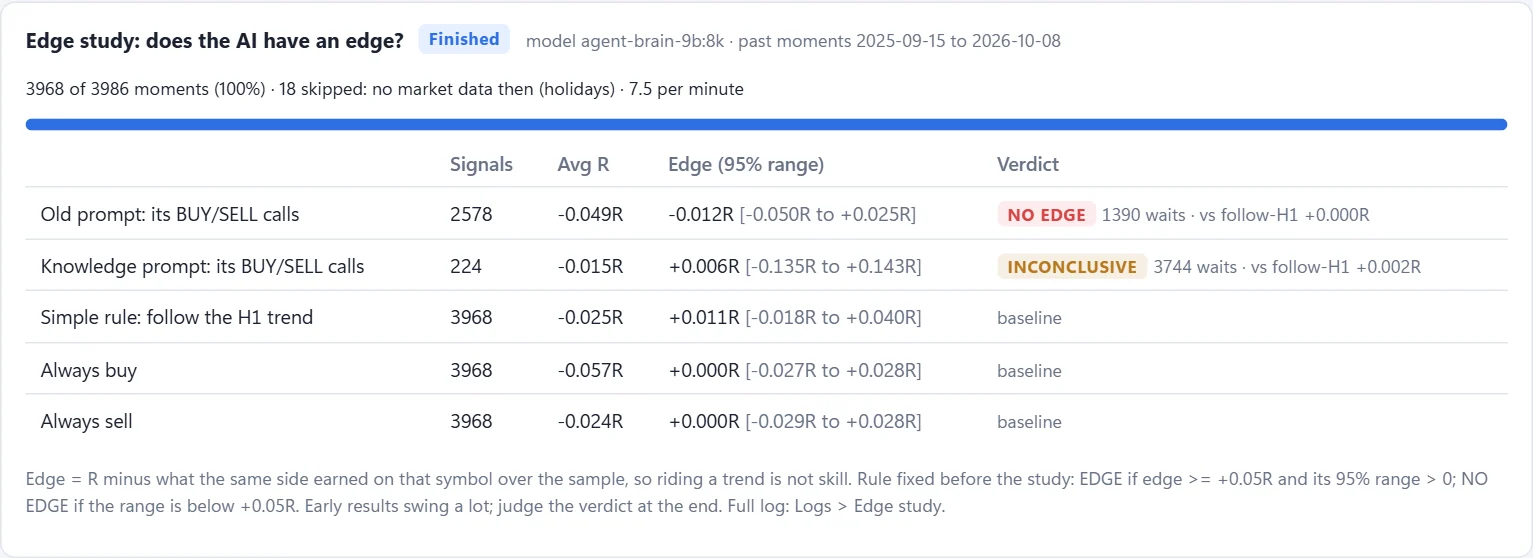
We then tested whether the AI's calls have an edge at all: an edge study replayed almost 4,000 moments from a year of price history (September 2025 to October 2026). Its BUY / SELL calls did no better than simply following the 1-hour trend, and its most confident calls did worse. A newer prompt that teaches it how its trades really work is still being measured against the old one on live decisions; it waits much more and has too few signals to judge yet.
So trading is moving, step by step, from the AI's calls to rule-based strategies that pass the Strategy Lab's tests. The first one, a daily breakout strategy that only buys, has traded on our demo since 11 October 2026 next to the AI: far too few trades to judge yet. The AI keeps trading while the Lab looks for more. Results may improve or not; that is why it trades demo accounts only by default.
How the AI trades: the big picture
Bubat AI splits every trade into two jobs. The AI decides only the direction: BUY, SELL or WAIT, with a confidence score and a one-sentence reason. Fixed rules written in code decide everything that involves money: entry price, stop loss, take profit, lot size, and whether the trade is allowed at all. The AI never calculates a price, never sees your balance, and cannot switch off a rule.
This happens once an hour, at the start of each hour, while the forex market is open (until 10 October 2026 it was every 5 minutes: about 35,000 answers in 5 days, with the graphics card busy two minutes in every five):
- Look: for each of the 29 instruments, gather charts, news and the bot's own recent decisions.
- Decide: the AI answers BUY, SELL or WAIT with a confidence score.
- Calculate: for strong signals, the rules work out the exact trade.
- Check: the best signals go first, and each must pass all 17 safety walls.
- Trade and manage: orders go to MetaTrader 5; open trades are watched every 15 seconds, all hour long.
- Learn: every signal is scored against what prices really did, each session is graded daily, the Strategy Lab tests new strategies every night, and (on 16 GB PCs) a daily review proposes improvements for you to approve.
What the AI sees for each pair
At the start of each hour, the AI receives a short report for one pair at a time:
| Input | What it contains |
|---|---|
| Price and trend | Current price on the 5-minute (M5) chart; where it sits against the 20 and 50 moving averages (EMA); a plain label such as "STRONG BEARISH (below 20 & 50 EMA)"; the % change over the last 100 candles; the high and low of that range; the last 5 candles. |
| Momentum | RSI(14) with a label (oversold, bearish pressure, bullish pressure, overbought) and MACD with its signal line and histogram. |
| Volatility | ATR(14): the average size of recent candles, used later to size the stop loss. |
| The bigger picture | The 1-hour (H1) trend: bullish, bearish or neutral. This matters most: the AI is told never to trade against it. |
| News | Up to 3 recent headlines about that pair from Google News, plus this week's economic calendar (high-impact releases such as NFP, CPI and central-bank decisions). |
| Trading knowledge (new prompt) | For a random half of the pairs each hour, as a test against the old prompt: notes written by code on the 1-hour, 4-hour and daily trend, how stretched the price is, where it sits in its 5-day and daily range, and whether a price level stands in the way of the target. It is also taught that its trades have 35 to 70 pip stops and usually last many hours. |
| Its track record (while it helps) | How its past calls in similar situations (pair, direction, 1-hour trend, RSI zone, session, confidence) really worked out, scored on real prices after costs, including anonymous signals from other Bubat AI users. A nightly check stops showing it if the AI's calls get worse with it: on our PC that happened on 9 October, so it is off there. |
| Its own history | The bot's last 5 recorded decisions on this pair, so it doesn't contradict itself without reason. |
| Learned rules | A short list of rules written after reviewing past losses (for example "wait when M5 and H1 disagree" and "pause around tier-1 USD news"). |
It does not see your balance, open profit, account number or other pairs' decisions. Everything runs on your PC; only the news lookups go to the internet.
How it decides, and why it often waits
The AI follows written instructions. The key ones:
- BUY in an uptrend (price above both moving averages, bullish momentum); SELL in a downtrend; WAIT when signals conflict or the market is flat.
- Never against the 1-hour trend. If the 5-minute and 1-hour pictures disagree, WAIT.
- Never through big news. If a high-impact release is due within 30 minutes, WAIT.
- Only cite news that is actually in the headlines, never invent a story.
It must also give an honest confidence score on this scale:
| Confidence | Meaning | Traded? |
|---|---|---|
| 0.82 to 0.90 | Strong trend AND a news headline that matches the direction | Yes (if every safety wall agrees) |
| 0.68 to 0.80 | Clear trend, but no pair-specific news | Usually no |
| 0.50 to 0.65 | Mixed or emerging trend | No |
| 0.30 to 0.49 | Flat or ranging market (WAIT) | No |
Only BUY or SELL signals with confidence 0.80 or more go any further, and anything above 0.89 is refused (in testing, the most "certain" signals did worse). In practice this means Bubat AI mostly trades when a clear trend lines up with a matching news catalyst, and waits otherwise. Many hours with few or no trades is normal and intended.
Because the AI never trades against the 1-hour trend, every BUY or SELL it gives agrees with that trend. Its real choice is when to trade and when to wait, which is exactly what the edge study measured (see Honest results).
If the AI's answer can't be read after 3 attempts, or the AI engine isn't responding, the bot treats it as WAIT: a failure never turns into a trade. If the AI engine (Ollama) has stopped, Bubat AI starts it again by itself.
From signal to order
- Queue, don't rush. All 29 pairs are analysed first; nothing is traded during the analysis.
- Rank the signals. Signals that agree with a full 1-hour trend go before weaker ones, then those with the lowest spread cost. The limited trade slots go to the best setups, not whichever pair happened to be analysed first.
- Calculate the trade (code, not AI):
- Entry: the current market price (Ask for BUY, Bid for SELL).
- Stop loss: 1.5 × ATR from entry, at least 15 pips on currencies ($3.50 on gold).
- Take profit: 3 × ATR from entry, and always at least 1.5 times the stop distance.
- Lot size: a fixed 0.01 lot by default (it can be switched to risk-based sizing in the settings).
- Pass the 17 safety walls (see The 17 safety walls). The first wall that says no stops the trade, and the reason is written to the log.
- Send the order to MetaTrader 5 with the stop loss and take profit attached, so the trade is protected even if your PC switches off.
Managing open trades, and after they close
- Every 15 seconds between its hourly decisions, the bot checks its open AI trades:
- Break-even: at +15 pips profit, the stop loss moves to entry + 1 pip, so the trade can no longer lose.
- Trailing stop: from +20 pips, the stop follows the price 10 pips behind it, moving in steps of at least 2 pips.
- Exits happen at the take profit, the (moved) stop loss, or by your hand in MetaTrader 5. The bot never closes AI trades early on its own. (Strategy Lab trades are different: they keep the stop and target they were tested with, no break-even or trailing, and may also close on their own exit rule or after a set time.)
- Rollover: for about an hour after 05:00 Malaysia time (06:00 from November to March: the broker's midnight) spreads widen, often to 10 to 35 pips, and most at Monday's open. A trade whose stop is close to the price can be stopped out by the spread alone.
- Cool-down: after a trade on a pair closes, that pair is not traded again for 30 minutes.
- Record: every closed trade is logged with how it ended (take profit, stop loss, break-even, trailing) and its result in R, which feeds the session grading and the daily review.
- Only its own trades: the bot only moves stops on trades it opened (marked with its own ID in MetaTrader 5); trades you open by hand are never touched. They do count toward its limits, though: open-trade count, one trade per pair, currency exposure and the daily loss limit.
- Gold uses dollar distances instead of pips: break-even at +$2.50, trailing from +$4.00, $2.50 behind the price.
Trading sessions and daily grading
Each trading session has its own limits for AI trades and its own share of the 8% daily loss limit, so one bad session can't use up the whole day. Times in Malaysia time (UTC+8):
| Session | Malaysia time | Max open trades | Loss budget |
|---|---|---|---|
| Asia | 06:00 to 15:00 | 4 | 1.6% of balance |
| London | 15:00 to 20:00 | 10 | 2.8% |
| London and New York overlap | 20:00 to 00:00 | 8 | 1.6% |
| New York | 00:00 to 05:00 | 6 | 1.6% |
| Rollover (spreads are widest) | 05:00 to 06:00 | 2 | 0.4% |
Every day each session is graded from its last 5 days of trades. A session that keeps losing is restricted automatically: first to Reduced (half the slots, major pairs only), then to Minimal (one slot). It is restored one level per day once its results recover. Grading only ever tightens; it never takes more risk than the defaults above.
How it learns
Every night the bot learns from its own trading, in steps that you can watch on the Brain tab:
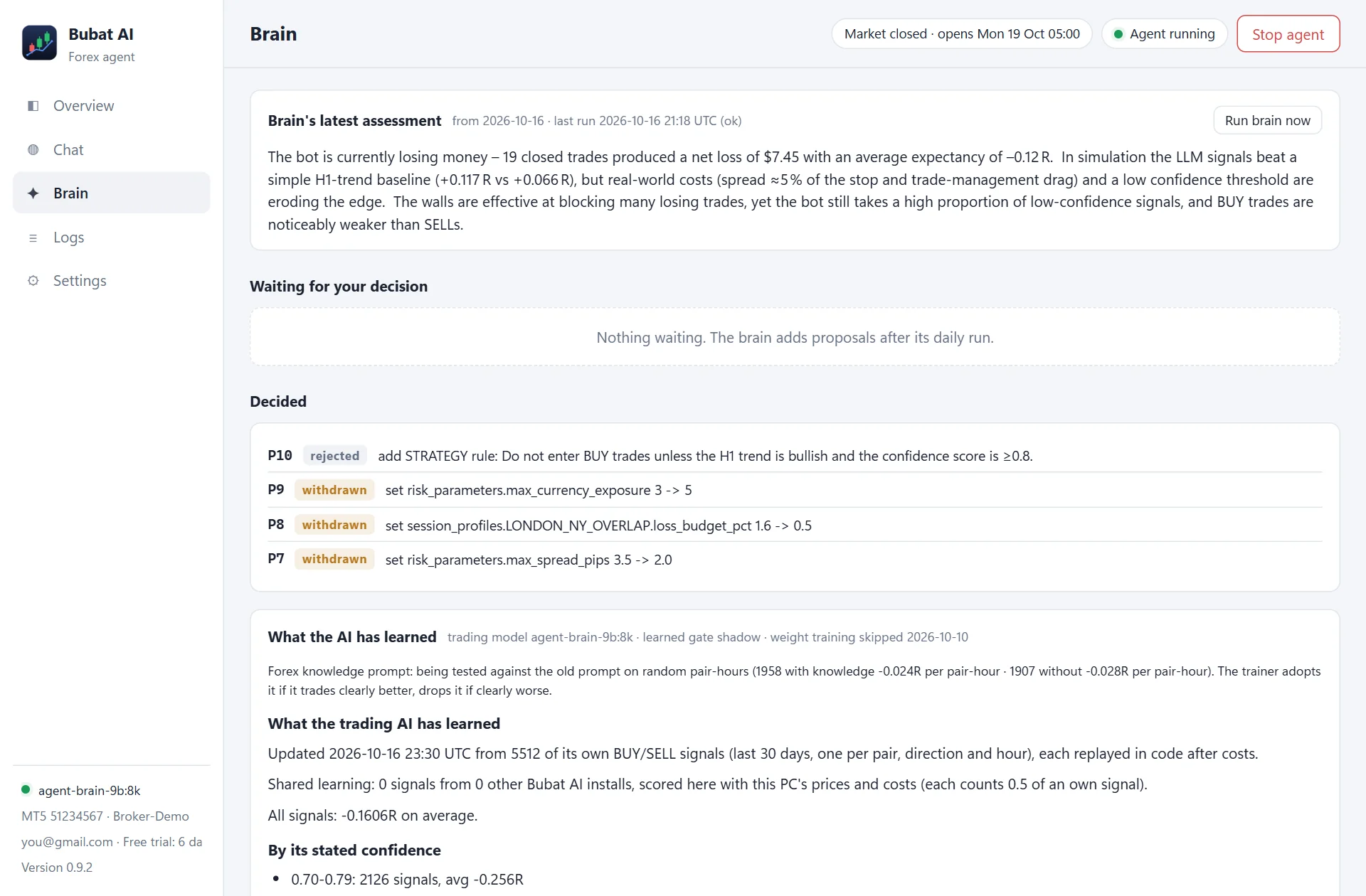
- Every signal is scored, traded or not: around 07:30 Malaysia time the trainer checks what prices really did after each BUY or SELL call, after costs, and builds the AI's track record for each kind of situation. The AI is shown that record before each decision, unless a nightly check finds that its calls got worse with it (on our PC they did, so it is off there).
- A learned gate can take over from the fixed 0.80 confidence rule, picking trades on their track record instead, but only while it beats the rule on days it was not built from. It switches itself on and off; so far it has mostly been off.
- Shared learning: each copy of Bubat AI shares its AI's signals anonymously and learns from everyone's, each scored again on your own broker's prices, so results cannot be faked.
- Trading knowledge: a newer prompt teaches the AI how its trades really work. It is used for a random half of the pairs each hour, and the bot compares the two prompts on their results before keeping either.
- Edge study: a replay of thousands of past moments that answers the question every trading bot should face: does the AI do better than a simple rule? Its result is on the Brain tab (see Honest results).
- Weight training (retraining the AI model itself) needs a strong graphics card and a large download, so it is not set up on tester PCs yet.
Learning must not quietly turn into "stop trading": the new prompt, for example, can only be kept if it still makes at least 30% as many trades as the old one. Better trades are what the Strategy Lab is for.
The daily review (the "brain")
On PCs with 16 GB of memory, a larger AI model (gpt-oss 20B) runs once a day at 05:05 Malaysia time, just after the rollover, and finishes before the next trading hour. It reads the last 5 days of results, compares the bot with simple alternatives (such as "just follow the 1-hour trend" and "never trade"), checks which safety walls helped, and proposes up to 3 improvements.
- Its claims are checked by code. Each proposal carries a replay of your real results computed by code, not the model's own evidence, and a proposal still waiting that a fresh replay no longer supports withdraws itself.
- It never changes anything by itself. Each proposal waits in the Brain tab for you to approve or reject, with the evidence and a check of the claim computed from your real results.
- It can only touch a short list of settings, within hard limits, for example the confidence threshold (0.70 to 0.95), maximum open trades (1 to 10), the spread limit (up to 3.5 pips), the news pause around releases, and each session's slots and loss budget. It can also suggest stopping a losing pair or adding a written rule.
- Each proposal is labelled SAFER or RISKIER by code, not by the AI.
- When you approve, the change is applied, the full test suite runs, and it is undone automatically if anything fails.
- Your reason for rejecting is saved, and the brain reads it on its next run.
- Ideas that would need a code change are listed separately, as suggestions only.
The Strategy Lab
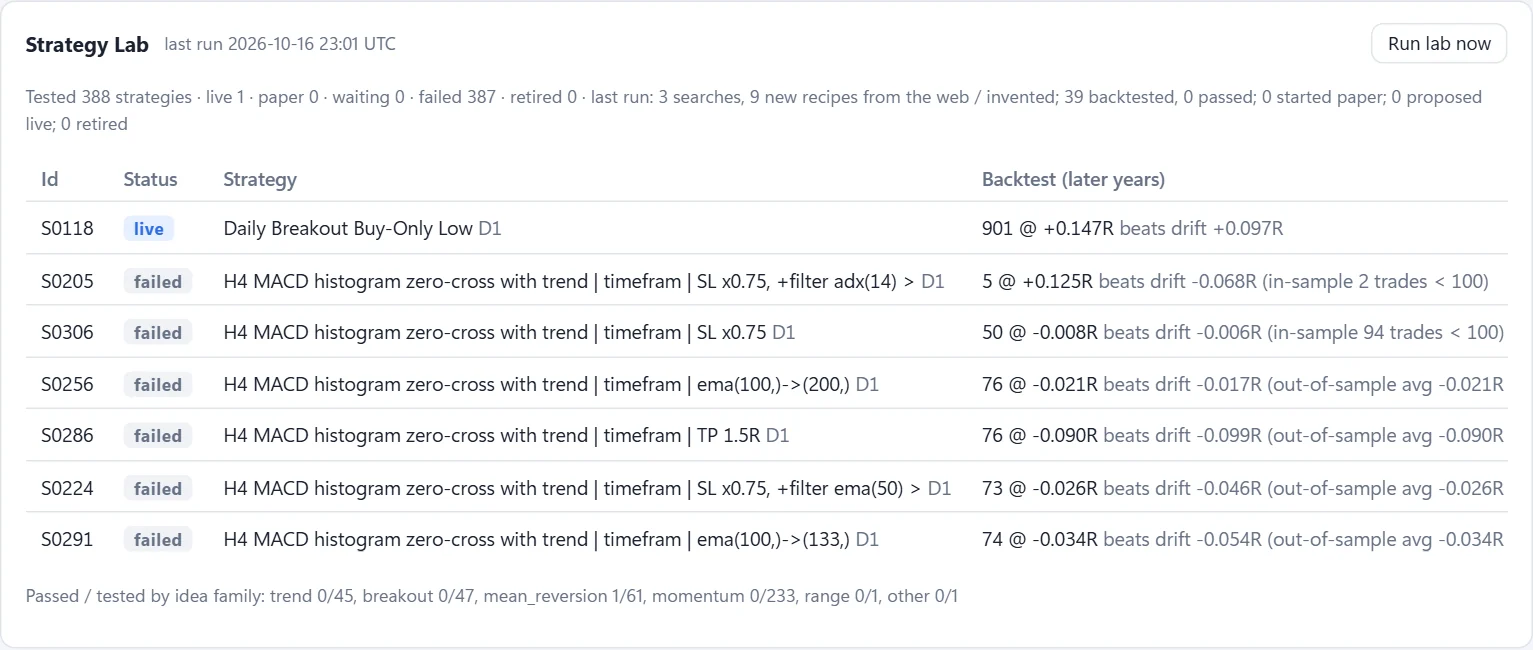
The Lab is Bubat AI's research department. Every night, around 06:15 Malaysia time, it writes rule-based strategies (for example "buy when the daily candle breaks the last 20 days' high") and tests them on 5 years of your broker's price history. Ideas come from a starting library, from variations of the best results so far and, on 16 GB PCs at weekends, from trading ideas the deep model finds on the web.
- Costs are real: your broker's spreads, 0.2 pip of slippage, overnight swap, and the wide spreads at the daily rollover (daily strategies enter after it).
- Tested on data it never saw: the first 70% of the history builds the strategy, the last 30% judges it. It needs at least 100 trades to build and 50 to judge, at least +0.05R per trade on the unseen part with a t-statistic of 2 or more, and profit in at least 60% of the years.
- It must beat drift. Markets drift (a currency can rise for months), so a strategy only passes if it beats taking the same trade at any random time in the same direction by at least +0.05R. A strategy that buys and sells may instead beat a random choice of direction.
- A luck bar: the more strategies are tried, the higher a result must be to stand out from luck, and the Lab shows that bar. Each idea may be varied at most 60 times so one idea can't flood it.
- Paper first: a strategy that passes paper-trades on live prices (up to 8 at a time). After 100 paper trades averaging at least +0.05R it is proposed for live trading, and it trades only once you approve it in the Brain tab.
- Live, but fenced: Lab trades use 0.01 lot, are labelled "Bubat Lab" in MetaTrader 5, and pass every account safety wall. They skip the AI's 1-hour trend and session rules (their own tested rules replace them), and the Lab may hold at most 7 of the 10 open trades and risk at most 6% of the balance, so the AI always keeps room.
- Retired by results: a live strategy whose last 20 trades average below -0.2R goes back to paper by itself; a paper strategy is dropped after 100 trades at or below zero, or 21 days without a trade.
Most ideas fail, and that is the point: on our PC the Lab has tested 388 strategies and 1 passed. The Overview's AI vs Strategy Lab card scores both side by side on your account (closed trades, average R, win rate, net result), and the Brain tab lists what the Lab is testing and why ideas failed.

What the AI can never do
- Choose prices, stop loss, take profit or lot size.
- Switch off, skip or change a safety wall.
- Trade a real-money account (unless you change that setting yourself).
- Change settings or code without your approval.
- Put a Strategy Lab strategy on live trading without your approval.
- Close or touch trades you opened by hand.
- Place an order from the chat: entry/TP/SL suggestions in the Chat tab are information only.
A worked example
A simplified example of one hourly decision (prices illustrative):
- At 21:00 Malaysia time, EURUSD is below both moving averages, RSI 38, MACD bearish, and the 1-hour trend is bearish. A headline says the euro is falling after weak German data.
- The AI answers:
SELL, confidence 0.84, "Bearish trend on M5 and H1 with a matching euro-negative headline." - 0.84 is between 0.80 and 0.89, so it is queued. After all pairs are analysed, it ranks first (full H1 trend, low spread).
- The rules calculate it: entry 1.1250 (Bid), ATR 9 pips, so the stop is 15 pips (the minimum) at 1.1265 and the take profit 27 pips away at 1.1223. Lot 0.01.
- The walls check it: demo account, no news due within 30 minutes, under 10 trades, no EURUSD already open, EUR exposure below 3, the stop costs under 2% of the balance and fits in what is left of today's 8% loss limit, spread 0.2 pips (about 1% of the stop), London-New York session has a free slot. All pass, and the order goes to MetaTrader 5 with SL and TP attached.
- The price falls 16 pips, so the stop moves to break-even. At 21 pips the trailing stop takes over. It reverses and closes at +12 pips (+0.8R). EURUSD then rests for 30 minutes.
If the same chart had come with no matching headline, the AI would most likely have scored it 0.72 to 0.78 and the bot would have waited.
The 17 safety walls
Every AI trade is checked against these, in order. The first one that fails stops the trade. The AI cannot switch them off. Strategy Lab trades pass the same walls except the 1-hour trend and the session rules (their own tested rules replace those), plus the Lab's own limits on open trades and risk.
| # | Wall | What it does |
|---|---|---|
| 1 | License | No new trades without a valid free trial or license. Trades already open are still managed. |
| 2 | Entry window | Optional trading hours. Off by default (all sessions trade). |
| 3 | Confidence cap | Signals the AI is "too sure" about (above 0.89) are refused: in testing they did worse, not better. |
| 4 | Demo account | Real-money accounts are refused unless you switch this off by hand. |
| 5 | H1 trend | Never buys against a falling 1-hour trend, never sells against a rising one (AI trades). |
| 6 | Daily loss stop | After losing 8% of the balance in one day (UTC), no new trades until the next day. |
| 7 | Capacity | At most 10 open trades at once. Strategy Lab trades may hold at most 7 of them, so the AI always keeps room. |
| 8 | One per pair | Only one open trade per currency pair. |
| 9 | News blackout | No trades from 30 minutes before to 15 minutes after big news. NFP, CPI and Fed decisions pause every pair. |
| 10 | Currency exposure | At most 3 open trades involving the same currency, counted separately for the AI (together with your manual trades) and for the Strategy Lab. |
| 11 | Gold guard | No gold (XAUUSD) on accounts under $300. |
| 12 | Risk per trade | Refuses a trade whose stop loss would cost more than 2% of the balance. |
| 13 | Open risk | Refuses a trade when what all open trades would lose at their stops, plus this one, is more than what is left of the day's 8% loss limit. Strategy Lab trades together may risk at most 6% of the balance. |
| 14 | Spread (pips) | Refuses when the spread is wider than 3.5 pips. |
| 15 | Spread cost | Refuses when the spread eats more than 6% of the stop-loss distance. |
| 16 | Session rules | Each session (Asia, London, New York...) has its own trade slots, spread limit and loss budget, tightened automatically when that session keeps losing (AI trades). |
| 17 | Margin | Refuses when there isn't enough free margin. |
What you need
- Windows 10 or 11, 64-bit. No administrator rights needed.
- 8 GB of memory minimum (16 GB recommended for the daily review and deep chat).
- About 25 GB of free disk space for the AI models.
- An NVIDIA graphics card with 4 GB or more is recommended. Without one it still works, slower, on 7 major pairs. While the market is open the trading AI stays loaded on it (about 5 GB on an 8 GB card).
- MetaTrader 5 from your broker, logged in to a demo account, with Algo Trading turned on.
- A Google account to sign in, and an internet connection.
Install, step by step
- Download BubatAI-Setup-<version>.exe from the official download page.
- Run it. If Windows says "Windows protected your PC", click More info, then Run anyway (the installer isn't code-signed yet).
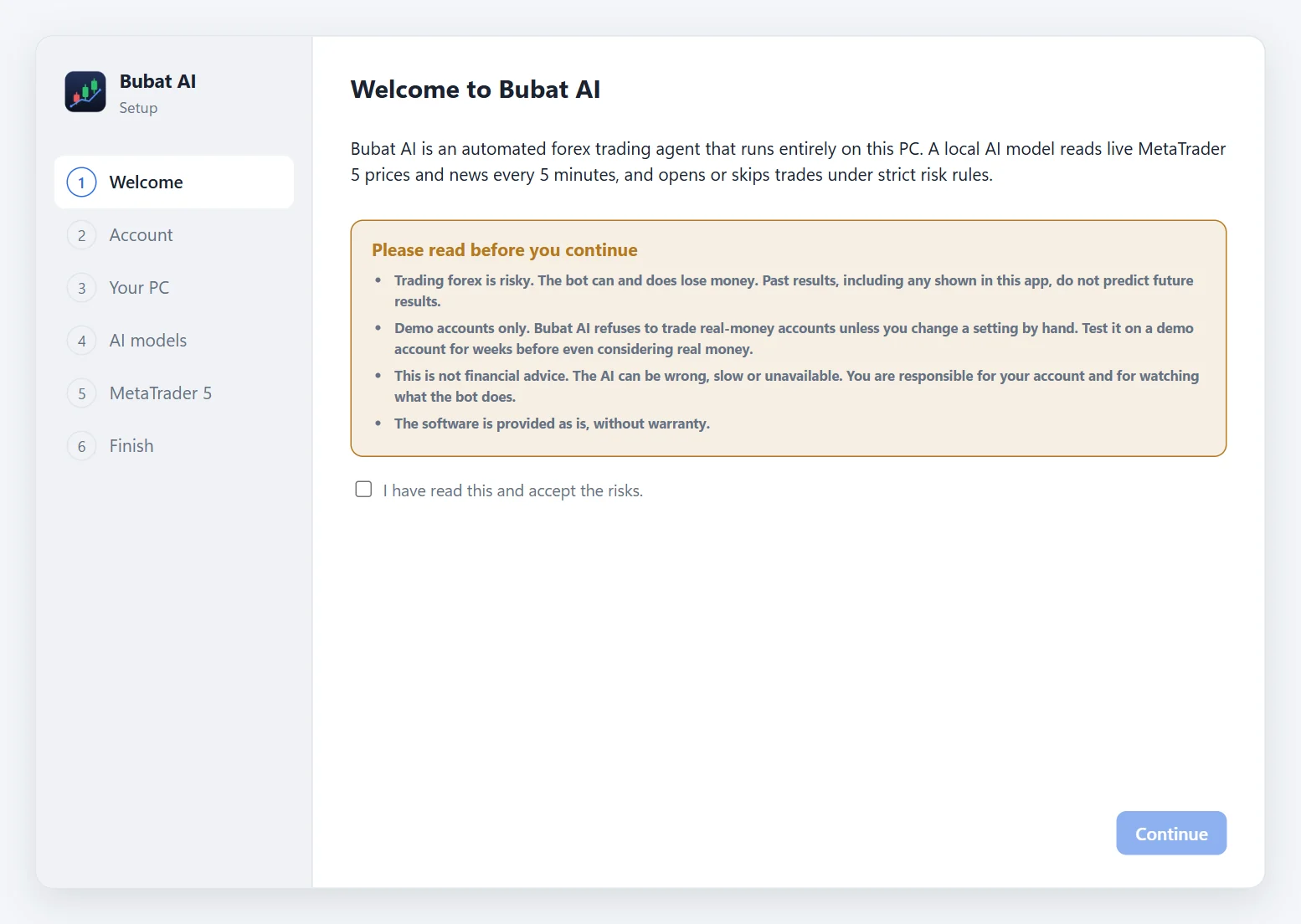
- Accept the risk notice, then read the system check: it tells you if this PC can run Bubat AI.
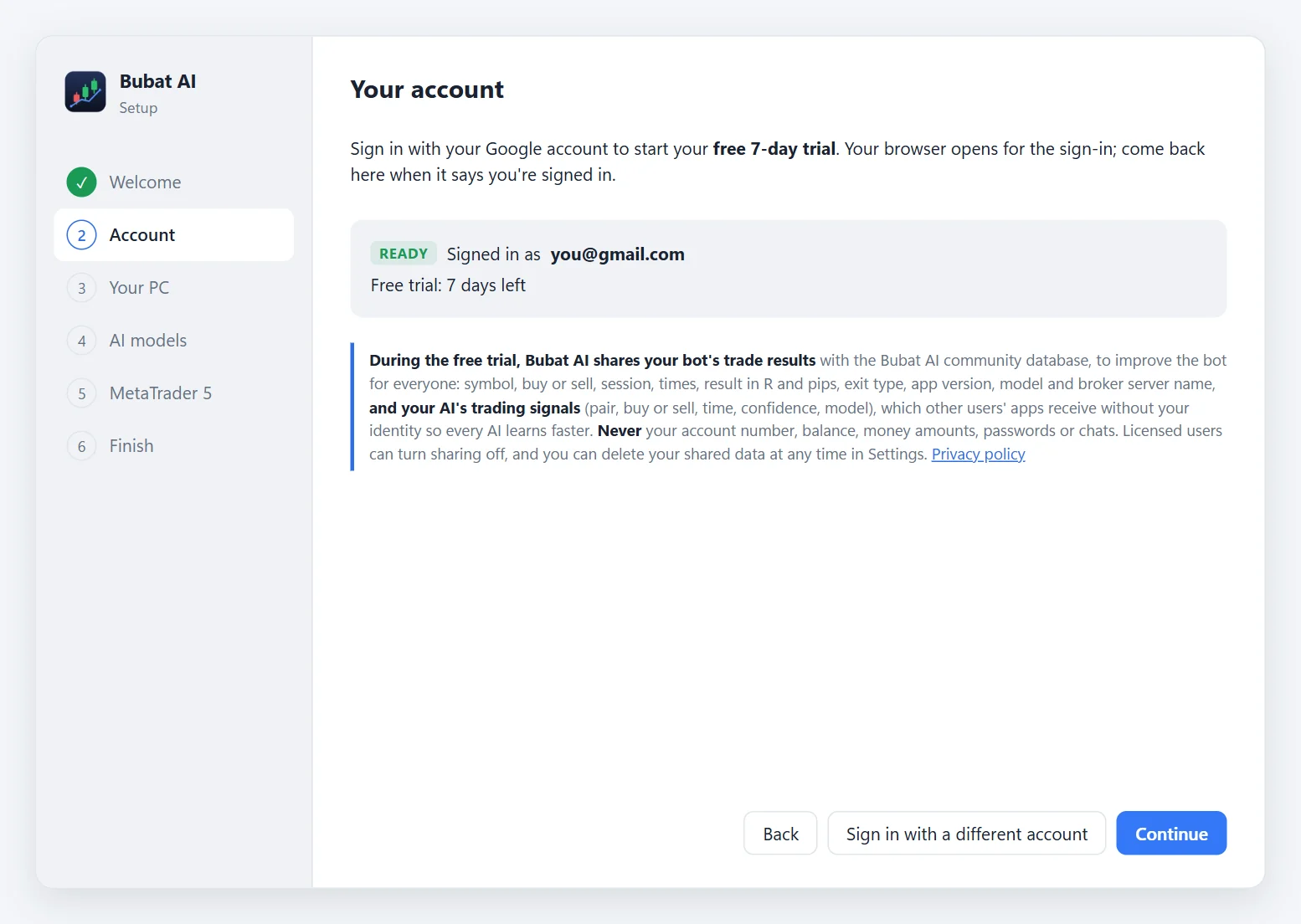
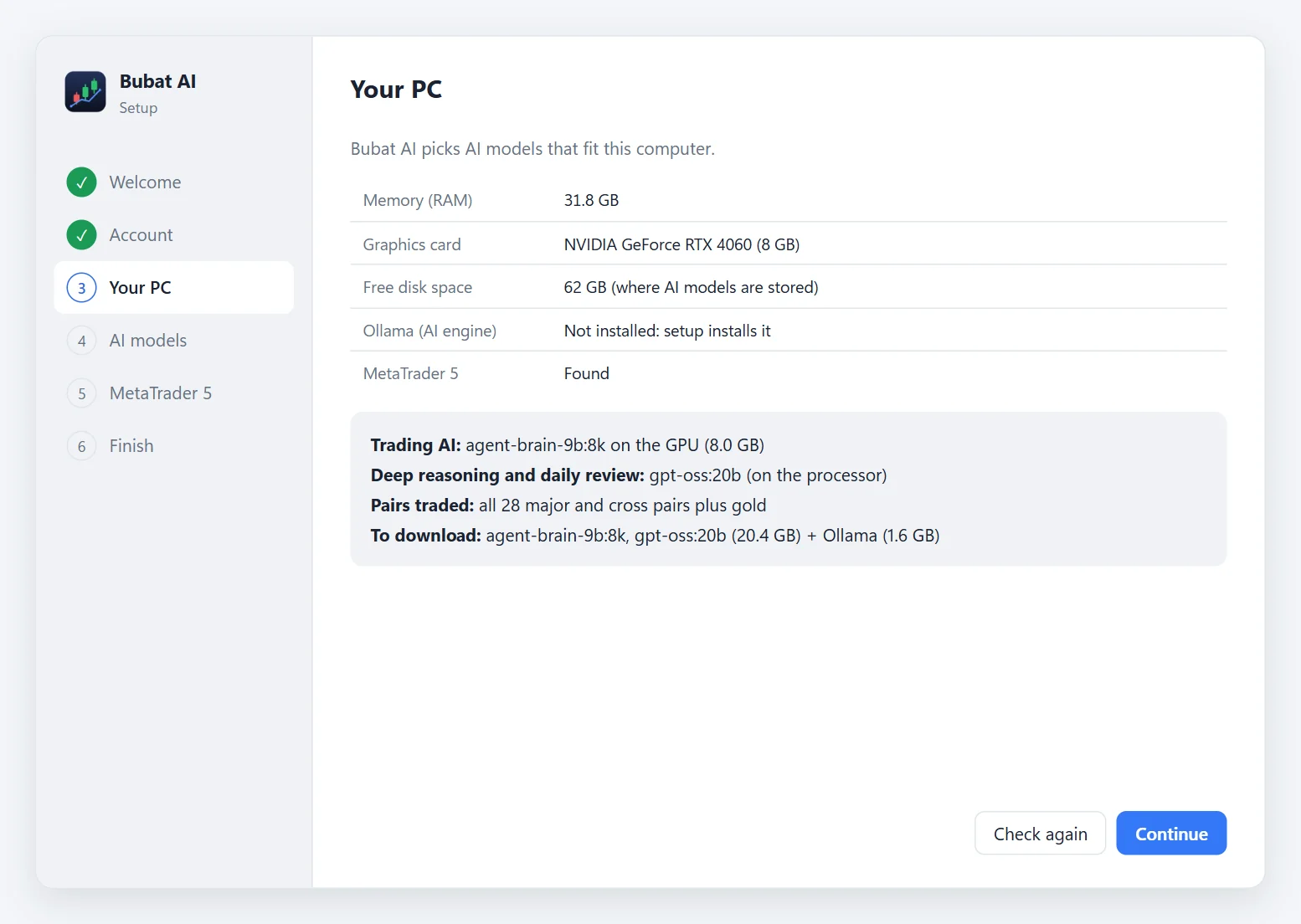
- Finish the installer and start Bubat AI. A setup wizard opens:
- Welcome: read and accept the risks.
- Account: press Sign in with Google. Your browser opens; sign in, then come back. Your free trial starts.
- Your PC: shows your memory, graphics card and disk, and the AI models chosen for it.
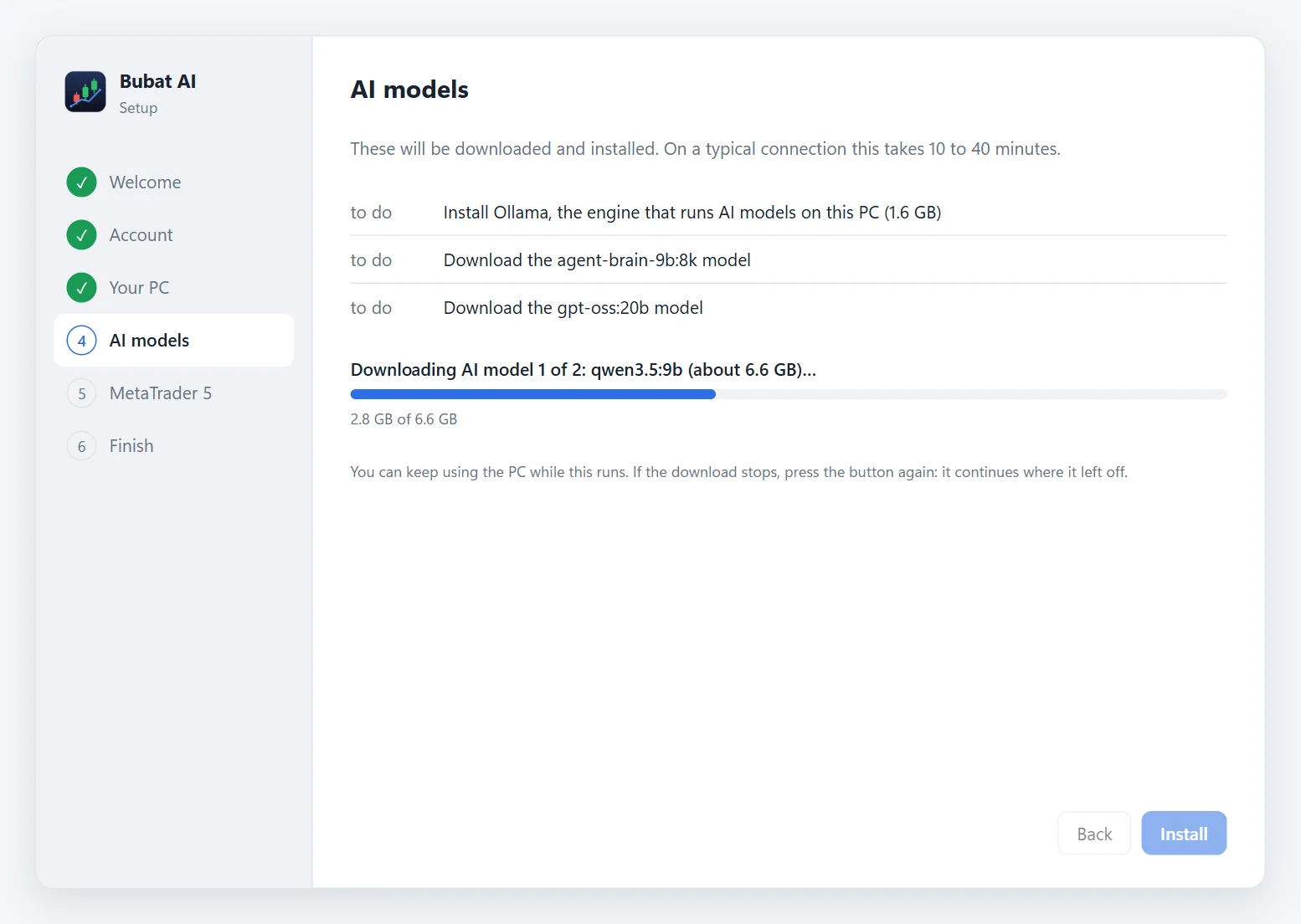
- AI models: press Install. It installs Ollama if needed and downloads the models (about 7 to 22 GB, usually 10 to 40 minutes). You can keep using your PC; if it stops, press Install again and it continues.
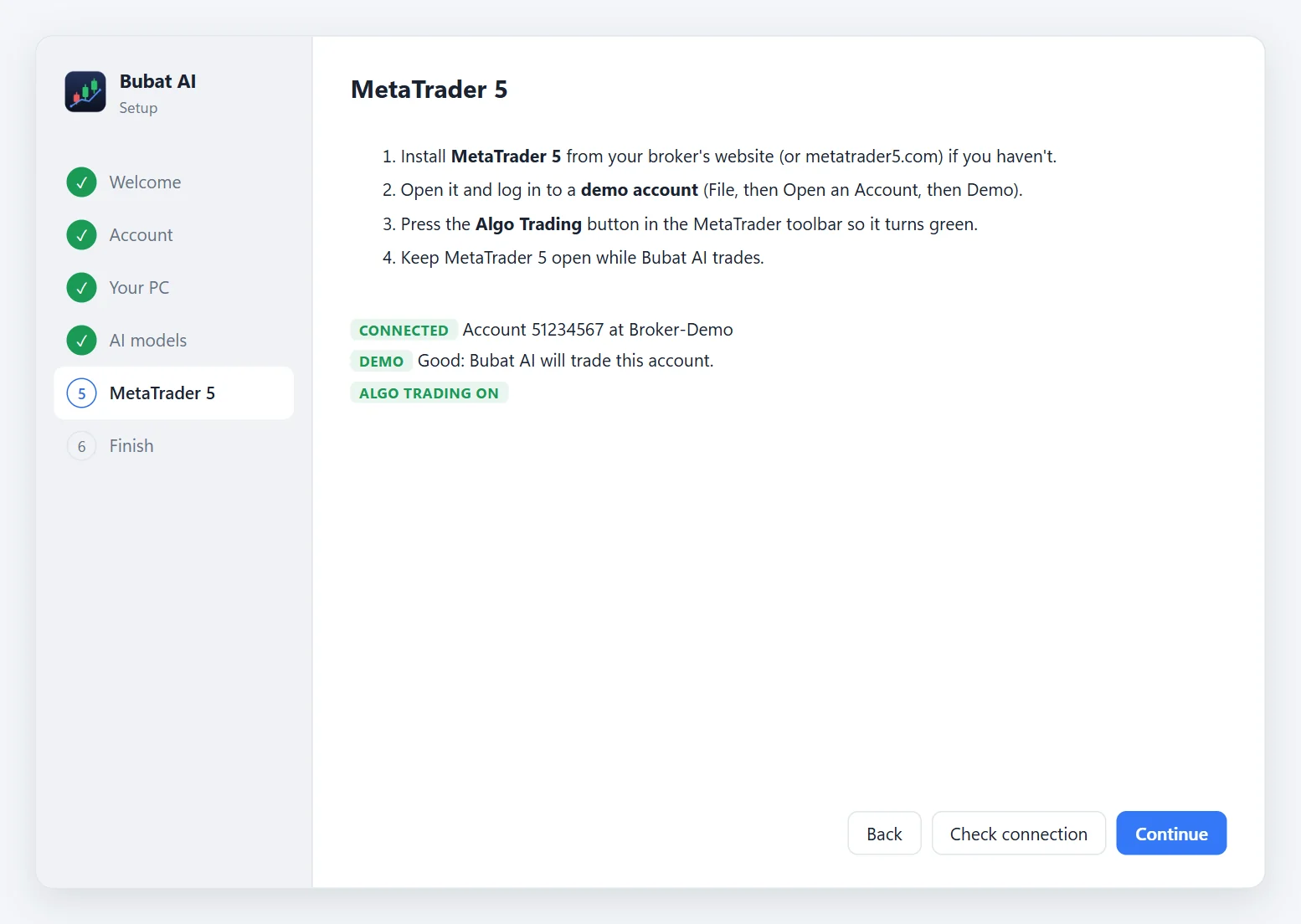
- MetaTrader 5: open MT5, log in to a demo account, turn on Algo Trading, then press Check connection. It should say CONNECTED and DEMO.
- Finish: leave Start the trading agent now ticked.
Optional: check the download is genuine by comparing its SHA-256 (PowerShell: Get-FileHash BubatAI-Setup-<version>.exe) with the .sha256 file on the download page.
Which AI your PC gets
The setup picks this automatically. The trading AI must answer for 29 pairs within a few minutes at the start of every hour, so it has to fit your PC.
| Your PC | Trading AI | Pairs traded |
|---|---|---|
| NVIDIA graphics card with 8 GB or more | Qwen3.5 9B on the graphics card | All 28 pairs + gold |
| NVIDIA graphics card with 4 to 8 GB | Qwen3.5 4B on the graphics card | All 28 pairs + gold |
| No suitable graphics card | Qwen3.5 4B on the processor (slower) | 7 major pairs only |
| 16 GB of memory or more (any of the above) | + gpt-oss 20B for deep reasoning and the daily review |
Free trial and license
- Free 7-day trial from your first Google sign-in. One free trial per PC.
- After the trial, a red banner appears and new trades pause. Trades that are already open keep being managed until they close.
- To get a license, email support@eabudakubat.com with the Google email you signed in with (the banner's Email support button fills it in). Once it's active, press Check again: trading resumes.
- Google sign-in only: licenses are tied to your Google account.
- Offline? If the license server can't be reached, Bubat AI keeps trading for up to 3 days.
Using the app
| Tab | What it shows |
|---|---|
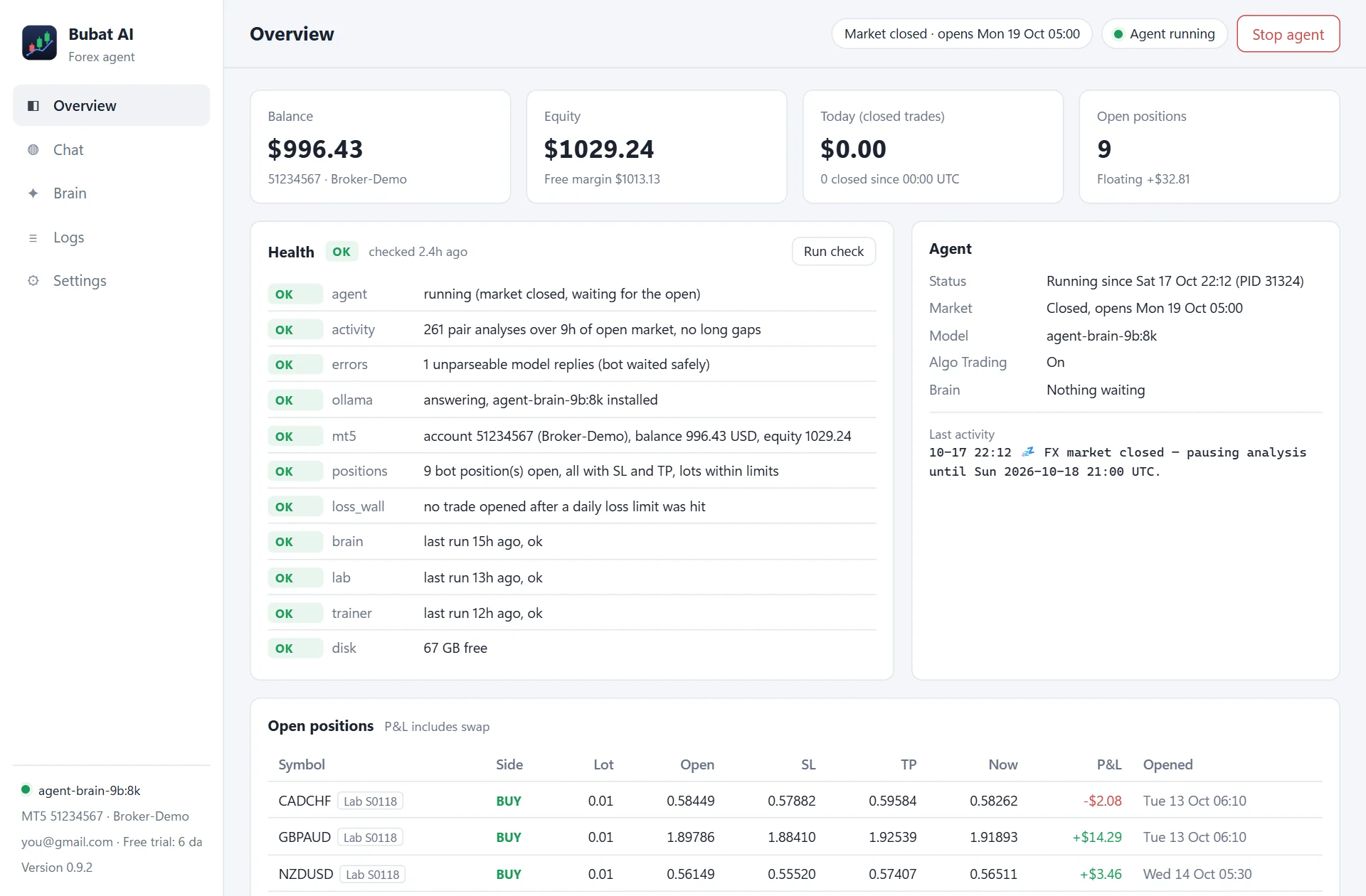
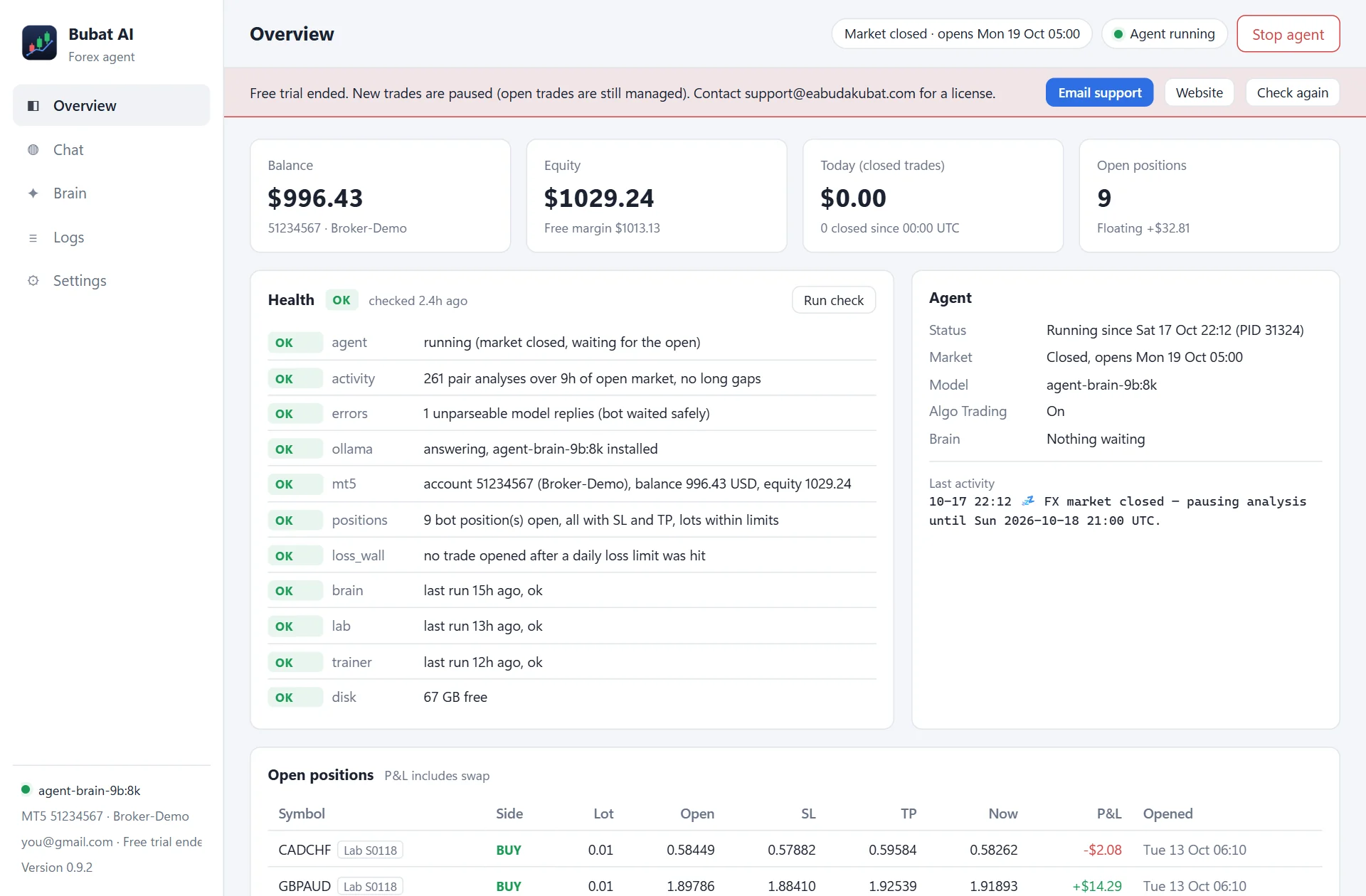
| Overview | Balance, equity, today's closed result, open positions with SL/TP and live profit (AI and Lab trades marked), the health check, agent and market status, and the AI vs Strategy Lab scoreboard. |
| Chat | Ask the AI anything about the market or your bot. Questions with why, should I, or entry / TP / SL use the deeper model with live prices and news. |
| Brain | The daily review and its proposals with Approve and Reject buttons (16 GB PCs), what the AI has learned, the Strategy Lab's results (with a Run lab now button), and the edge study. |
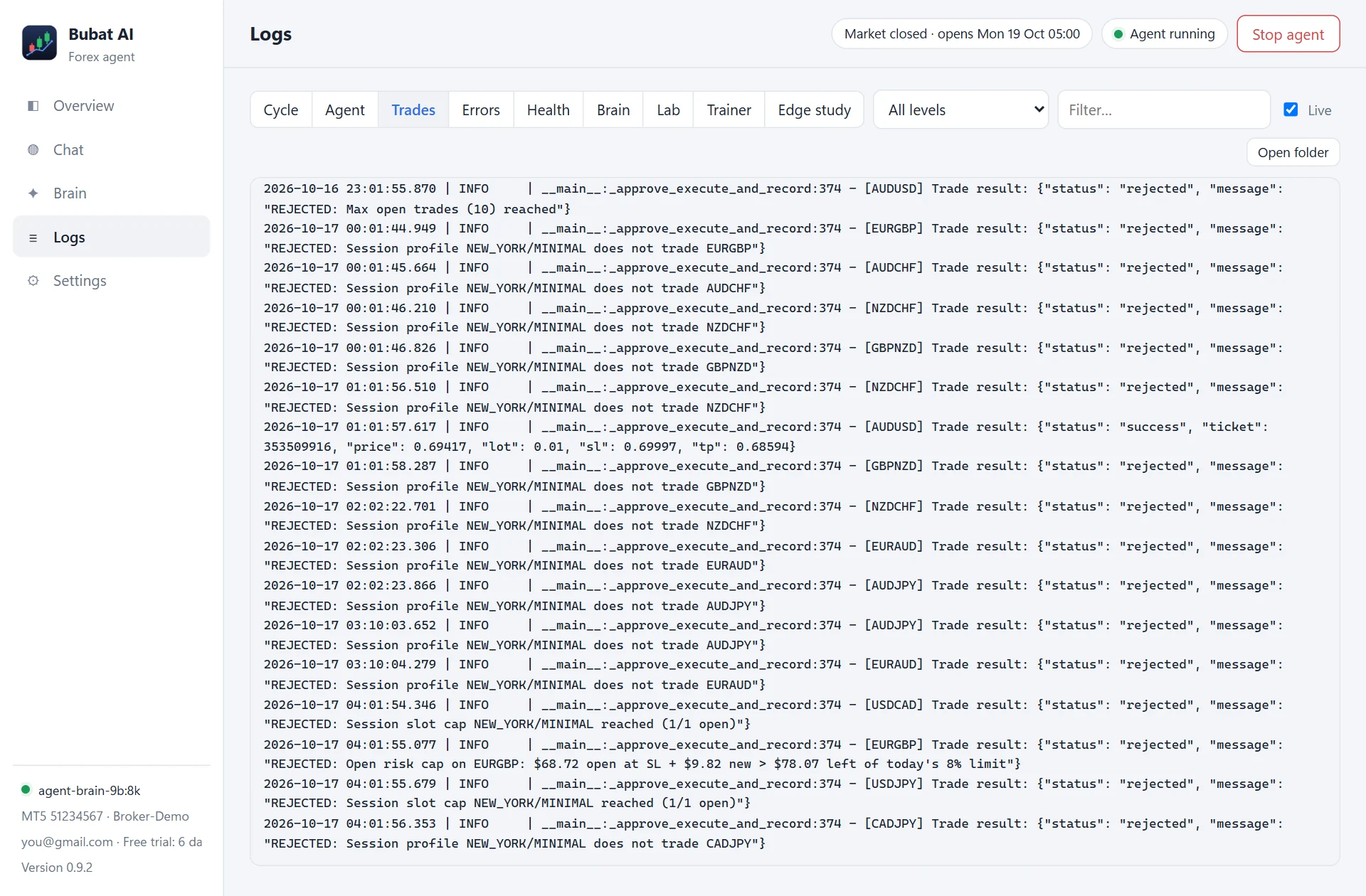
| Logs | Each hourly cycle, the agent, trades, errors, health checks, brain, Lab, trainer and edge study, with search. |
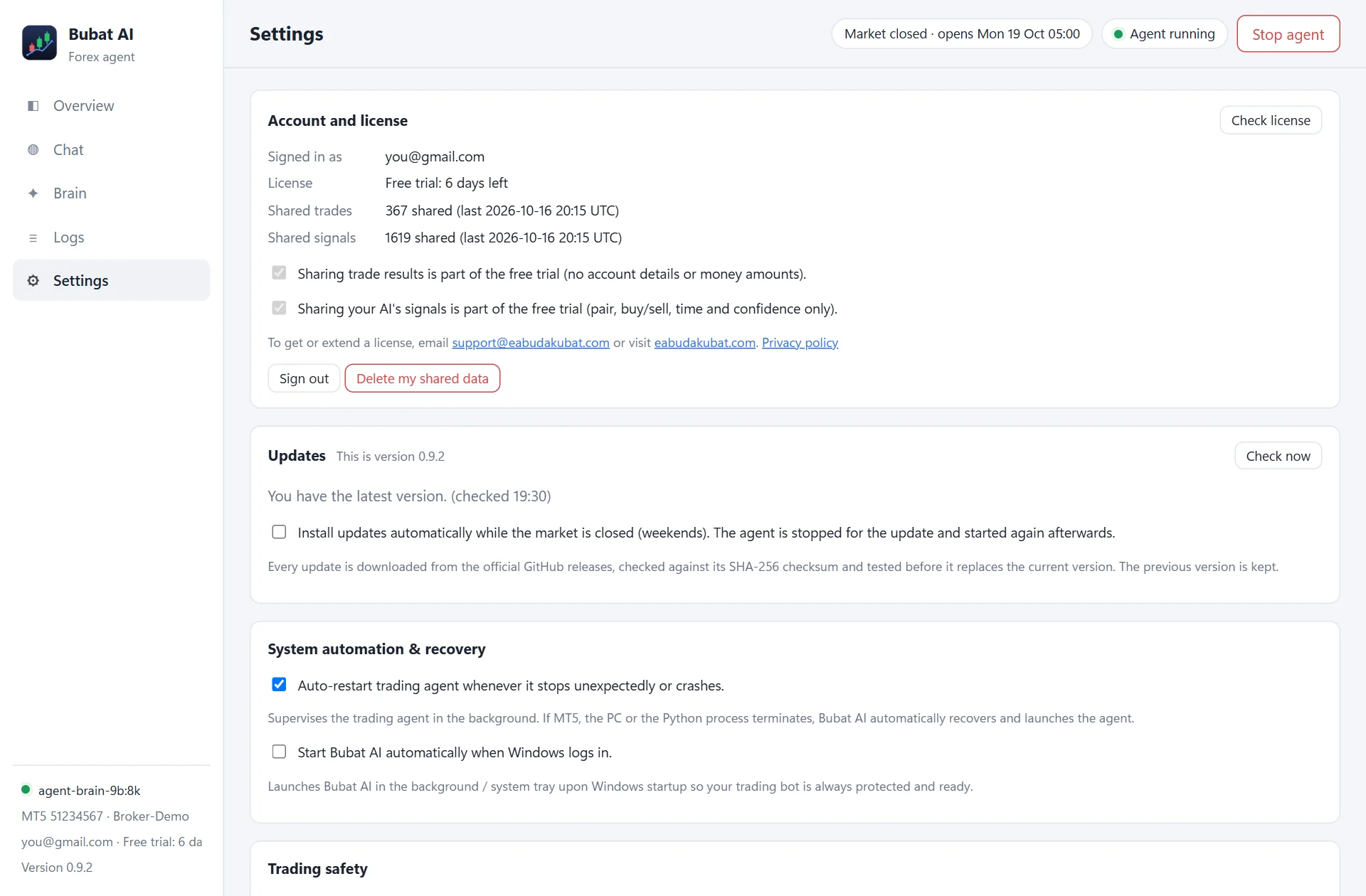
| Settings | Account and license, data sharing (trade results and signals), updates, automatic agent restart and start with Windows, trading safety, run setup again. |
The Overview is pictured at the top of this page.
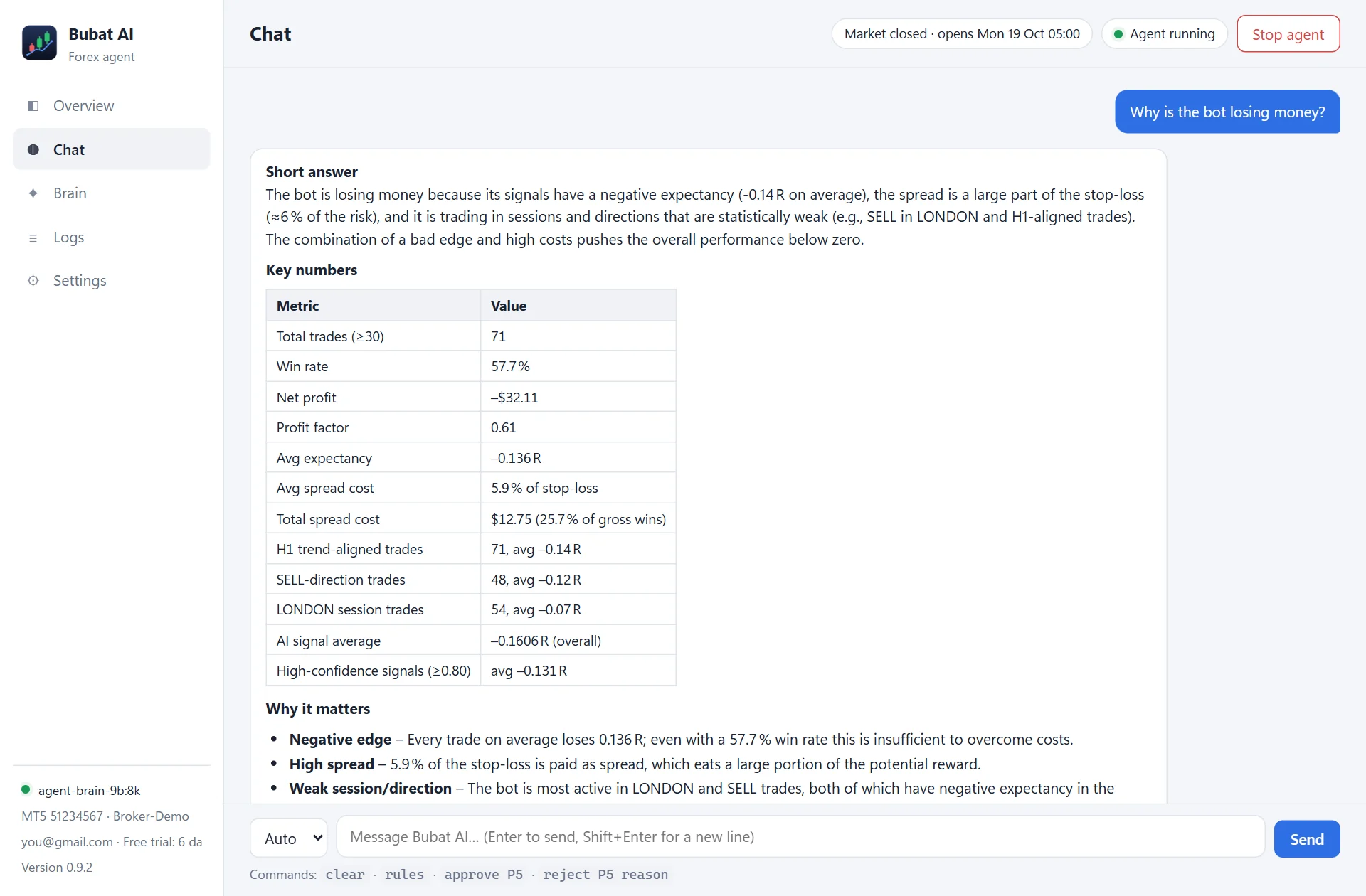
Chat examples: "Why is the bot losing money?", "Give me entry, TP and SL for GBPUSD", "Which pairs look best this session?". Commands: think <question> forces the deep model, fast <question> the quick one, clear resets the conversation, approve P5 / reject P5 reason decide a proposal.
Start / Stop agent (top right) controls trading. Stop lets the agent finish its current step; open trades keep their stop loss and take profit in MetaTrader 5.
Advanced settings (lot size, daily loss limit, risk walls) are in %LOCALAPPDATA%\Programs\Bubat AI\app\forex_local_agent\config.json. Stop the agent, edit, then start it again. Your settings are kept when Bubat AI updates.
Keeping it running
- Closing the window doesn't stop trading. Bubat AI moves to the tray icon next to the clock; click it to reopen.
- Keep the PC awake while the market is open: Windows Settings, System, Power, set Sleep to Never.
- Keep MetaTrader 5 open and logged in, with Algo Trading on.
- If the trading agent stops unexpectedly, the app starts it again by itself (Settings, System automation & recovery). From version 0.9.2 it stays stopped after you press Stop, until you press Start.
- Weekends: the forex market closes Friday 5 PM New York time (Saturday 5 or 6 AM Malaysia) and reopens Sunday at the same time. The bot pauses by itself and resumes when the market opens.
- Health check: every 12 hours the app checks the agent, MetaTrader 5, the AI engine, open positions and the loss limits, and notifies you on WARN or FAULT.
Updates
Bubat AI checks for updates every 6 hours and shows Update available. Each update comes only from the official download page, is verified with a checksum and tested before it replaces anything, and keeps your settings and history. The agent is stopped during the update and started again after. If anything goes wrong, Settings has Go back to the previous version. You can also let it install updates automatically while the market is closed.
During the beta, new versions are published as pre-releases on the download page. Version 0.9.0 can't see those, so if you have 0.9.0, download the newest setup and run it over your install once: your sign-in, license, settings and history are kept, and new settings are added. From 0.9.1 on, updates appear in the app by themselves.
Your data
- Never leaves your PC: your MetaTrader login, password, account number, balance, money amounts, chats and logs.
- Sent for your license: your Google email and an anonymous ID for your PC.
- Shared to improve Bubat AI: the bot's trade results (pair, buy/sell, session, times, result in R and pips, how it closed, app version, AI model, broker server). Required during the free trial; licensed users can turn it off. Anyone can delete what they shared in Settings.
- Shared with other users' apps (shared learning): your AI's buy and sell signals (pair, buy or sell, time and confidence), without your email or any other identity, kept for 90 days. Part of the free trial; with a license you can turn it off, and your app then also stops receiving other users' signals.
Full details: Privacy Policy and Terms of Use.
Troubleshooting
| Problem | What to do |
|---|---|
| "Windows protected your PC" when installing | The installer isn't code-signed yet. Click More info, then Run anyway. |
| The app says "Agent stopped" | Press Start agent (top right). If it refuses, read the message: usually the license or Ollama. |
| Red banner: "Free trial ended" | New trades are paused. Email support@eabudakubat.com for a license, then press Check again. |
| "MT5 not connected" | Open MetaTrader 5 and log in. Bubat AI connects to the MetaTrader 5 that is open on the same PC. |
| The bot never trades | Check Algo Trading is ON (green) in MetaTrader 5, the account is a demo, and the market is open. Few trades is also normal: most signals are blocked by the safety walls on purpose. |
| Health check shows WARN or FAULT | Open Overview: each line says what is wrong. FAULT means something needs fixing now. |
| Model download stopped | Run setup again from Settings and press Install: downloads continue where they stopped. |
| Chat answers are slow | Deep "why" questions use the larger model and can take 1 to 5 minutes, longer on a PC without a graphics card. |
| Games stutter while the market is open | The trading AI stays loaded on the graphics card (about 5 GB) between its hourly decisions. Stop the agent, set "ollama_keep_alive": null in config.json, and start it again: the memory is then freed a few minutes after each decision, and each decision starts a little slower. |
| A trade hit its stop around 05:00 or 06:00 Malaysia time | That is the daily rollover: for about an hour the broker's spreads widen, often to 10 to 35 pips, so a stop close to the price can be hit by the spread alone. Monday's open (Sunday night in New York) is the widest. |
| Something broke after an update | Settings, then Go back to the previous version. |
Still stuck? Email support@eabudakubat.com with a screenshot and the file logs\desktop.log from the app's folder (Settings, Open logs folder).
Uninstalling
Windows Settings, Apps, Bubat AI, Uninstall. The agent is stopped first; open trades stay in MetaTrader 5 with their stop loss and take profit. Ollama and the AI models are left in place because other apps can use them: uninstall Ollama the same way if you no longer need it.
FAQ
Will it make me money?
Nobody can promise that, and so far it hasn't: see Honest results above. Treat it as an experiment on a demo account.
Why does it trade so rarely?
By design. A trade needs confidence of 0.80 or more, which the AI only gives when a clear trend on both the 5-minute and 1-hour charts lines up with a matching news headline, and then all 17 safety walls must agree. Quiet, news-free or choppy markets mean hours of WAIT.
What is the difference between AI trades and Lab trades?
AI trades come from the AI's hourly BUY / SELL calls and are labelled "Bubat AI" in MetaTrader 5. Lab trades come from a fixed rule-based strategy that passed the Strategy Lab's tests and that you approved; they are labelled "Bubat Lab" and the strategy's ID. Both use 0.01 lot and the same account safety walls, and the Overview's AI vs Strategy Lab card scores them side by side.
Why does a Lab trade stay open for days?
Lab strategies trade daily or 4-hour charts with wide stops, and close a trade at its stop, its target, its own exit signal or after a set number of bars, exactly as they were tested. They don't use the AI's break-even or trailing stop.
Can I use it on a real-money account?
Not by default. You would have to change a setting by hand, and we strongly advise against it until it has been profitable on demo for months.
Does it send my trades or account to anyone?
Your account number, balance and money amounts never leave your PC. During the trial, the bot's trade results (pair, direction, result in R) are shared to improve Bubat AI. See Your data.
Does it need the internet?
Yes, for live news, the license check and updates. The AI itself runs on your PC. If the license server can't be reached, it keeps trading for up to 3 days.
Does it work on Mac, Linux or MetaTrader 4?
No. Windows 10 or 11 (64-bit) with MetaTrader 5 only.
Can I change the lot size or risk settings?
Yes, in config.json in the app's folder (see Using the app). The default is a fixed 0.01 lot.
Will it touch the trades I open myself?
No. It only moves stops on its own trades. Your manual trades do count toward its limits (open trades, one per pair, currency exposure, daily loss), so it may trade less while yours are open.
Does it trade when my PC sleeps?
No. Keep the PC awake while the market is open (set Sleep to Never).
Is it the same as EA Budak Ubat?
No. EA Budak Ubat is a grid Expert Advisor that runs inside MetaTrader. Bubat AI is a separate Windows app with an AI that decides each trade.
Contact
Licenses and support: support@eabudakubat.com · Download: official download page